LeaferJS 插件开发教程

前言

Leafer 是新开源的一个 2D 图形绘制库,目前已经有了 1.1k 的 Star 数,成长趋势非常不错,本篇不对 Leafer 过多介绍,不了解的同学可以直接阅读官网介绍,或者阅读我在之前写的 LeaferJS 尝鲜 及 应用数学 文章中也做了简单的介绍

由于目前 Leafer 尚在成长期,现在仍然还只是一个单纯的 图引擎,许多功能可能还需要社区来支持,前段时间写了一个 Leafer 插件,整理了一下 Leafer 插件的开发方法,本篇主要是教大家如何为 Leafer 实现一个简单的 Tooltip 插件,以供社区开发者参考。

本来本篇文章应当更早一些就发出来了,但是为了保证严谨,一边阅读 Leafer 插件的源码,一遍撰写,在撰写过程中发现了一个问题,排查了很久才确定,提交 issue 后才继续撰写本文,这也就导致了延期发布。

插件系统介绍

插件系统是现在开源库很多都会实现的一种能力,为了方便社区提供更灵活的功能,插件系统必不可少。

在 Leafer 发布 v1.0.0-beta.8 发布之前,Leafer 插件具有很大的限制,一个实例只能使用一个插件,但在 beta.8 中,加入了全局实例的生命周期钩子,不必单独在实例中指定,如此灵活性得到了大幅提升。

创建插件

如果要将插件发布 npm 包,则约定命名方式为 leafer-xxx-plugin , 这样方便后续其他开发者进行搜索。

插件属性

属性 说明 类型 默认值
name 可选参数,插件的 npm 包名 string -
import 指定需要从 leafer-ui 中导入的方法 string[] []
importVersion 当前使用的 leafer-ui 版本号,用于检查用户 leafer-ui 版本是否兼容 string -

插件方法

方法 说明 回调参数
run 插件的主程序,自动运行, 支持传入配置对象 config。 LeaferUI: IObject, config?: IObject
onLeaefer leafer 实例创建钩子,当 leafer 实例创建完成后,会调用 leafer: ILeafer

创建示例

创建插件

@leafer-ui/interface 包含了所有类的接口,如 ILeafer 对应 Leafer,需要单独安装。

  • run 函数是插件的主函数
    • 第一个参数 LeaferUI: 是 import 属性中声明导入的方法和类
    • 第二个参数 config: 是用户使用插件时传入的参数,插件可以指定需要哪些参数。
  • onLeafer 函数是 Leafer 创建时的生命周期钩子
    • 该函数是为了解决插件无法获取所有 Leafer 实例的问题
    • 参数 leafer 传入的是当前创建的 Leafer 实例
1
2
3
4
5
6
7
8
9
10
11
12
import { IPlugin, IObject, ILeafer } from '@leafer-ui/interface'

export const plugin: IPlugin = {
importVersion: '1.0.0.beta.2',
import: ['Leafer'],
run(LeaferUI: IObject, config?: IObject): void {
console.log(LeaferUI, config) // { Leafer }, { }
},
onLeafer(leafer: ILeafer): void {
console.log(leafer) // on created leafer
}
}

使用插件

  • 使用插件时只需要拿到 plugin 对象,并通过 usePlugin() 传入插件对象和自定义参数即可。
1
2
3
4
5
6
7
8
9
import { usePlugin, Leafer } from 'leafer-ui'

import { plugin } from './create'

const config = {}

usePlugin(plugin, config)

new Leafer({ view: window })

usePlugin 源码

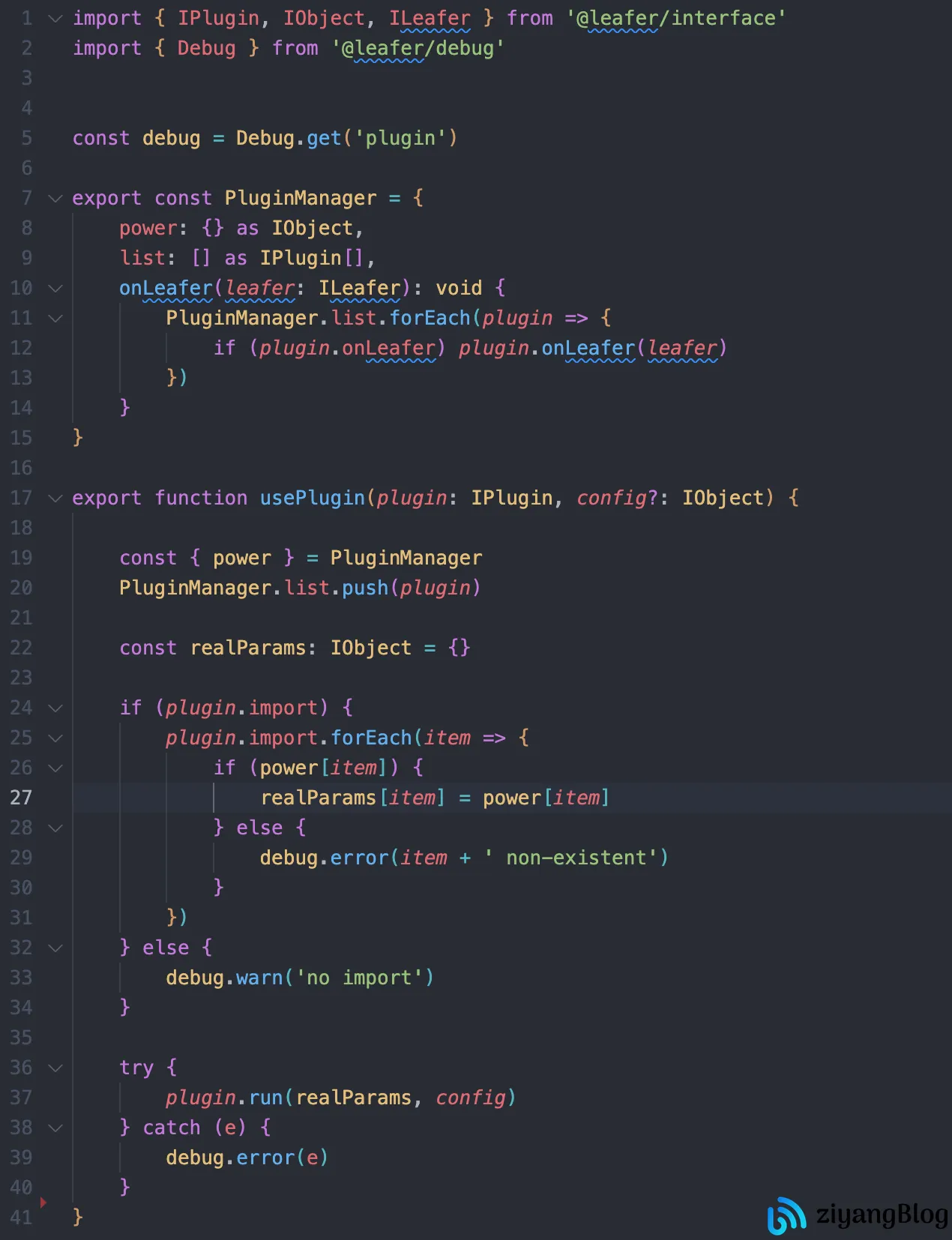
以下是 usePlugin 中的实现

LeaferJS 插件开发教程

PluginManager

PluginManager 是维护了全局的插件

  • power: Leafer 中所有的方法
  • list: 当前已注册的插件
  • onLeafer: leafer create 钩子

这里就不贴注入 PluginManager.power 与调用 PluginManager.onLeafer 的方法了,有兴趣的可以在 leafer-ui 仓库中自行查阅。

usePlugin

在 usePlugin 中,首先将 plugin 注册到 PluginManager.list 中,要注意到这时 PluginManager 其实就是一个简单的发布-订阅模式,由 usePlugin 进行订阅,在 leafer 创建时执行 PluginManager.onLeafer(leafer) 进行通知发布。

PluginManager.power 在程序运行一开始就被注入了平台相关的所有能力,如 web 端注入了 @leafer-ui/web, node 端注入了 /packages/platform/node 相关能力。

通过 plugin.import 获取插件开发者所需依赖,将 Leafer 方法按需将依赖注入到 realParams 中转换为真实参数,再调用 plugin.run 传入转换后的真实参数和用户配置。

实现一个提示框插件

接下来,将会讲解如何实现一个提示框插件。

在正式开始前,我们先介绍一个方法:LeaferTypeCreator

LeaferTypeCreator

LeaferTypeCreator 是用于提供 Leafer 实例额外的能力,其实类似与插件。

创建一个 LeaferType

下面注册了一个名为 background 的 LeaferType, 当有 Leafer 类型指定为 background 时,会调用 backgroundType 这个方法。

1
2
3
4
5
6
7
import { LeaferTypeCreator } from '@leafer/interface'

LeaferTypeCreator.register('background', backgroundType)

function backgroundType(leafer: ILeafer) {
leafer.fill = 'red';
}

使用 LeaferType

在实例化 Leafer 时,指定 type 为 background, 此时 Leafer 背景色会变为 红色。

1
const leafer = new Leafer({ view: window, type: 'background' })

可以看到,我们通过 LeaferTypeCreator 也可以实现类似于插件的能力,但缺点是每个 Leafer 只能指定一个类型,不能同时作用于多个 LeaferType。

实现提示框

我将整个实现过程分为三步进行讲解,让大家更容易理解这个插件具体要做的事情。

1. 需求分析

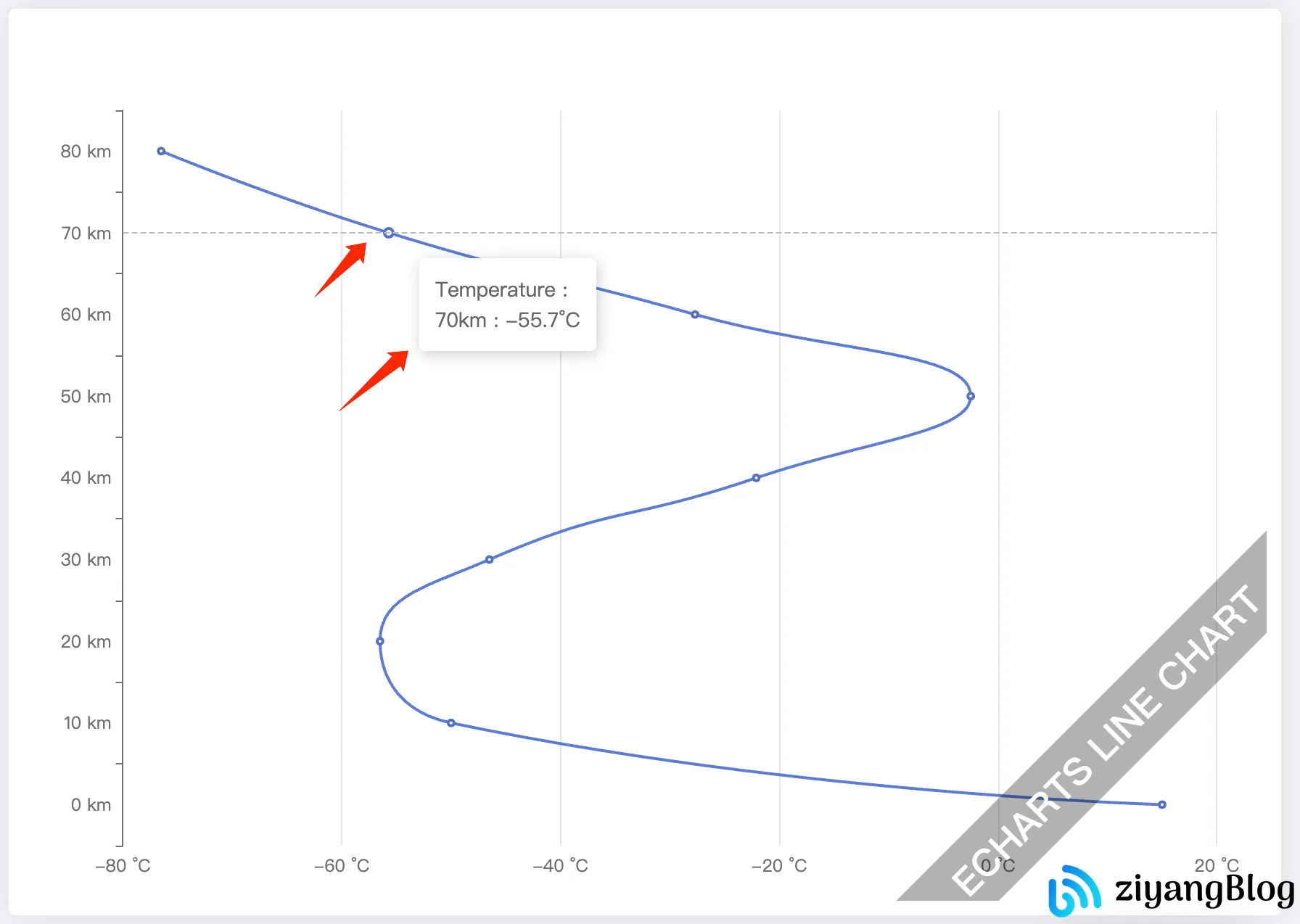
一个很常见的场景,一个页面中有很多元素,要展示各种各样的信息,为了避免画布上文字过多,且不易于直观阅读,我们需要一个小工具,使我们能在数据悬浮时展示相应的信息。

如下图是一个 Echarts 示例,鼠标放到数据点上,展示当前点位更详细的信息。
LeaferJS 插件开发教程

2. 实现思路

提示框可以完全使用 Leafer 实现,但使用 HTML 实现更加通用,且更容易控制样式。

我们可以监听用户鼠标在 Leafer 实例当前的位置,同时监听 Leafer.view 鼠标移动事件,这样,当我们确定要触发事件时,只需要使用 dom 位置即可,不需要再进行位置换算。

如下图,我们只需要拿到 pageX 与 pageY , 就能确定当前鼠标的位置,如果只依赖 Leafer 坐标则还需要进行大量的判断如:画布平移、缩放等等。

img

3. 具体实现

我们实例只实现关键部分,不对扩展功能进行具体实现。

创建 Plugin 对象

在上面我们讲了,onLeafer 会在所有的 Leafer 实例创建时调用,而 LeaferTypeCreator 可以指定 Leafer 使用时才生效,这样,我们就可以根据用户参数,判断这个插件是需要全局生效还是指定的 Leafer 实例生效。

这样做的好处是,插件的作用域是可控的,不会因此导致所有的 Leafer 都必须使用插件。

由于我们只有在 run 函数中才能接收到插件调用者传入的 config, 所以当我们想在 onLeafer 中使用 用户传入的 config 与 LeaferUI 时,必须将 LeaferUI 与 config 挂载到当前对象上。

1
2
3
4
5
6
7
8
9
10
11
12
13
14
15
16
17
18
19
20
21
22
23
24
25
26
27
28
29
30
31
32
33
import { ILeafer, IObject, IPlugin, IUI } from '@leafer-ui/interface';

// 用户配置参数类型
type UserConfig = {
type?: registerType,
getContent: (node: IUI) => string,
}

export const plugin: IPlugin = {
name: 'tooltip-plugin',
importVersion: '1.0.0-beta.8',
import: ['LeaferTypeCreator', 'LeaferEvent', 'PointerEvent'],
config: null,
LeaferUI: {},
run(LeaferUI: IObject, config: UserConfig): void {
// 将 config 与 导入的 LeaferUI 挂载到当前插件对象
this.config = config;
this.LeaferUI = LeaferUI;
// 如果用户传入了自定义的注册类型,则注册一个类型插件
if (config.type) {
const LeaferTypeCreator = LeaferUI.LeaferTypeCreator;
LeaferTypeCreator.register(config.type, (leafer: ILeafer) =>
tooltipPluginType(leafer, LeaferUI, config)
);
}
},
onLeafer(leafer: ILeafer) {
// 只有当用户没有传入类型时才会全局生效
if (!this.config?.type) {
tooltipPluginType(leafer, this.LeaferUI, this.config);
}
},
};

tooltipPluginType

通过 PointerEvent.MOVE 可以监听 leafer 中的鼠标移动事件,我们可以根据这个事件捕获画布上的元素。

通过 LeaferEvent.VIEW_READY 可以监听 Leafer 实例化时的事件,这时可以通过 event.view 拿到画布的DOM 元素,我们可以直接监听 DOM 的鼠标移动事件,当 PointerEvent.MOVE 捕获到画布元素时进行展示 Tooltip。

1
2
3
4
5
6
7
8
9
10
11
12
13
14
15
16
17
18
19
20
21
22
23
24
25
26
27
28
29
30
31
32
33
34
35
36
37
38
39
/**
* @param { ILeafer } leafer leafer 实例
* @param { IObject } LeaferUI Leafer UI
* @param { UserConfig } config 用户自定义配置
*/
function tooltipPluginType(
leafer: ILeafer,
LeaferUI: IObject,
config: UserConfig
) {
const { PointerEvent, LeaferEvent } = LeaferUI;
const domId = Math.random().toString(32).slice(2, 10);

let mouseoverNode: IUI | null = null;
// leafer 鼠标移动事件,用于捕获节点
leafer.on(PointerEvent.MOVE, (evt) => {
const node = evt.target;
// 如果是 Leaefer 实例,则不进行展示,同时隐藏弹窗
if (node.isLeafer) {
mouseoverNode = null;
const tooltipDOM = document.getElementById(domId);
if (tooltipDOM) {
tooltipDOM.style.display = 'none';
}
return;
}
mouseoverNode = node;
});

// 挂载画布事件
leafer.on(LeaferEvent.VIEW_READY, () => {
if (!(leafer.view instanceof HTMLElement)) return;
// 监听 dom 鼠标移动事件,如果同时 leafer 中捕获到了元素,则进行展示。
leafer.view.addEventListener('mousemove', (event: MouseEvent) => {
if (!mouseoverNode) return;
createTooltip(domId, event, mouseoverNode, config);
});
});
}

createTooltip

创建弹框的部分就比较简单了,这里就不展开讲了,代码中关键步骤都加入了注释。

1
2
3
4
5
6
7
8
9
10
11
12
13
14
15
16
17
18
19
20
21
22
23
24
25
26
27
28
29
30
31
32
33
34
35
36
37
38
39
40
41
42
43
44
45
46
47
/**
* 创建提示元素
* @param { string } domID dom id
* @param { MouseEvent } event DOM 事件
* @param { IUI } node 触发事件的元素
* @param { UserConfig } config 用户传入的配置
* @returns
*/
function createTooltip(
domId: string,
event: MouseEvent,
node: IUI,
config: UserConfig
) {
// 拿到需要显示的 html 字符串
const content = config.getContent(node);

// 判断当前插件是否生成 dom, 如果生成了,则复用之前的,否则就创建一个
let container: HTMLElement | null = document.getElementById(domId);
const isExists = container !== null;
if (!isExists) {
container = document.createElement('div');
}
if (container === null) return;

container.setAttribute('id', domId);
container.innerHTML = content;
// 添加样式
const cssStyle = {
display: 'block',
position: 'absolute',
left: event.pageX + 4 + 'px',
top: event.pageY + 4 + 'px',
padding: '8px 10px',
backgroundColor: '#fff',
borderRadius: '2px',
boxShadow: '0 0 4px #e2e2e2',
}
Object.keys(cssStyle).forEach((prop: any) => {
container.style[prop] = cssStyle[prop];
});
// 如果之前不存在,则将创建的 dom 追加到 body
if (!isExists) {
document.body.appendChild(container);
}
}

至此,一个简单的 Tooltip 弹框插件就实现好了,不过这个示例缩减了部分功能和逻辑判断,更完整的实现在文末给出。

一个重复注册插件引发血案

这是在撰写本文时发现的一个问题,同一个插件 重复注册 会引起一个 bug。

在上文中我们已经知道了,我们只有在 run 函数中才能拿到用户传入的 config, 如果我们在 onLeafer 中想要使用,只能通过挂载到当前插件对象上实现。

示例代码

1
2
3
4
5
6
7
8
9
10
11
12
13
14
export const plugin: IPlugin = {
name: PLUGIN_NAME,
importVersion: '1.0.0-beta.8',
import: ['LeaferTypeCreator', 'LeaferEvent', 'PointerEvent'],
config: null,
run(LeaferUI: IObject, config: UserConfig): void {
// config 挂载到当前对象
this.config = config;
},
onLeafer(leafer: ILeafer) {
// onLeafer 中拿到 config
console.log(this.config)
},
};

如果这个插件只会使用一次没有问题,如果当注册多次时会覆盖之前的插件参数

异常代码

下面提供了一个示例代码, 插件接收一个 myType 参数, 当连续注册多个相同插件时,最后一次注册的插件参数会覆盖前面的参数。

1
2
3
4
5
6
7
8
9
10
11
12
13
14
15
16
17
18
19
20
21
22
23
24
25
26
27
28
// 模拟一个插件
export const plugin: IPlugin = {
importVersion: '1.0.0-beta.8',
import: ['LeaferTypeCreator', 'LeaferEvent', 'PointerEvent'],
config: null,
run(LeaferUI: IObject, config: UserConfig): void {
this.config = config;
},
onLeafer(leafer: ILeafer) {
console.log(this.config)
},
};


// 第一次注册插件:
usePlugin(plugin, {
myType: 'plugin-1',
});
// 此时打开控制台,检查 `PluginManager.list` , config 为: { myType: 'plugin-1' }

// -----------------------------------------------------------------------------

// 第二次注册插件:参数发生修改
usePlugin(plugin, {
myType: 'plugin-2',
});

// 此时打开控制台,检查 `PluginManager.list` 会发现第一个插件的 `config` 变为第二个注册的参数

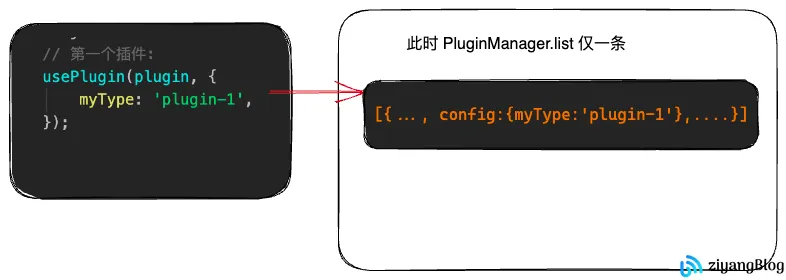
注册第一个插件

PluginManager.list 仅有一条,同时 config 为插件注册的 {myType:'plugin-1'}
LeaferJS 插件开发教程

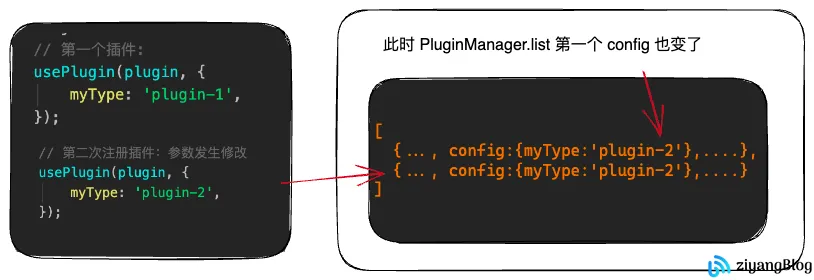
注册第二个插件

PluginManager.list 有两条数据,两个插件的 config 都是第二个插件注册的 {myType:'plugin-2'}
LeaferJS 插件开发教程

原因及解决方法

其实产生这个问题的原因很简单,就是由于在 plugin 实现中,直接使用了用户传入的插件对象,在 run 函数执行时所有相同插件对象的 this 指向的都是同一个,这就造成了即便 config 不同,也只有最后配置一个生效的问题。

如我们需要解决这个问题,也很简单,当注册多个相同的插件时,每次注册都对当前的对象进行浅拷贝即可

1
2
3
4
5
6
7
8
9
10
11
12
13
14
15
16
17
18
19
20
// 第一次注册插件: 
usePlugin(plugin, {
myType: 'plugin-1',
});

const plugin2 = { ...plugin };

// 第二次注册插件
usePlugin(plugin2, {
myType: 'plugin-2',
});

//...注册多次相同插件...

const pluginMore = { ...plugin };

// 第 n 次注册插件
usePlugin(pluginMore, {
myType: 'plugin-more',
});

对于该问题,已向 leafer 提交了 pr ,在注册插件时,使其内部浅拷贝解决,但根据 leafer 在 issue 的回复,这块的逻辑可能会进一步修改。

结语

这篇文章的主要目的是为弥补官网插件示例过于简单的问题,同时将我在开发插件时的一些思考整理成文章以供社区开发者参阅。


LeaferJS 插件开发教程
https://blog.pangcy.cn/2023/08/06/前端编程相关/前端框架与库/Leafer/LeaferJS 插件开发教程/
作者
ziYang | 子洋
发布于
2023年8月6日
许可协议